Just today, with big checkboxes.
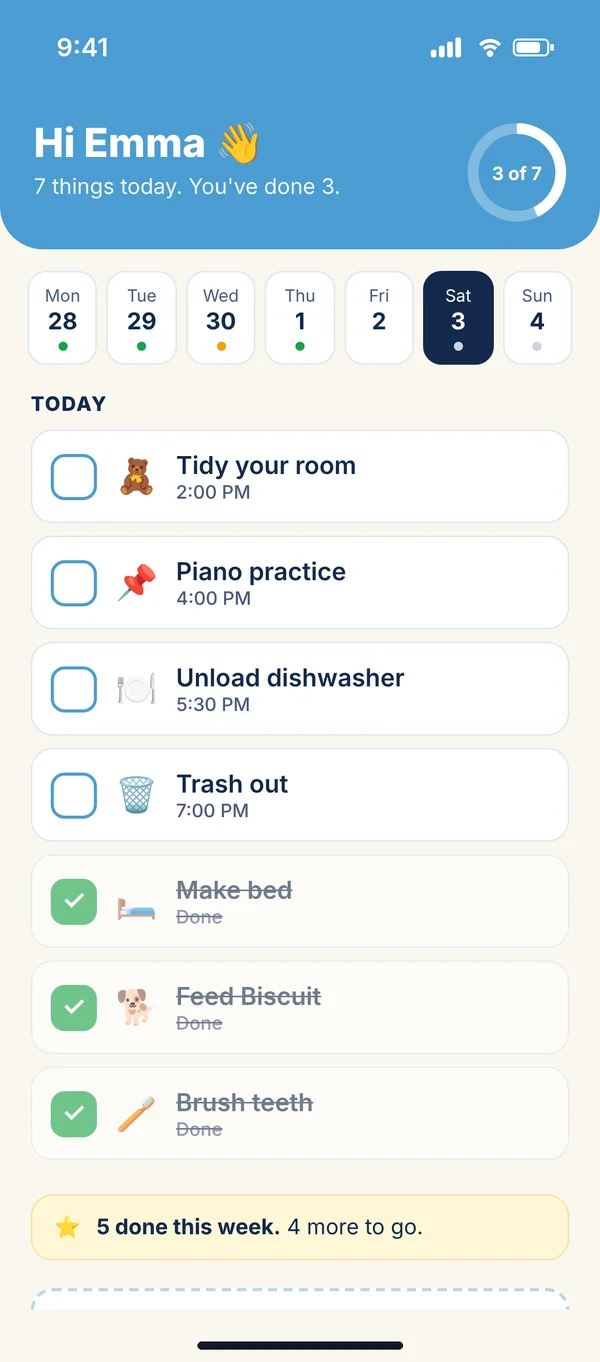
Kids 12 and under do not get a calendar. They get My List: their chores and their events for today, with checkboxes big enough for a tablet, a row of the week, and a star when the week's chores are done. They sign in with a name and a PIN a parent sets up. No email, no password.
Make bed. Piano. Walk Biscuit.
Today's list, in order, with what time (or "any time today"). Tap the box and it is done, with a strike through it. The ring at the top fills as the day goes. The week runs across the top: a dot for each day with something on it, filled when it was done.
- Chores from the family chart, in their color
- Their own events: practice, a playdate, a birthday party
- "+ Add something" so they can put their own things on the list
A name and a PIN.
Set up on the Family page by a parent, after the parent check.
No email, no password
A short username and a four-digit PIN they tap in. Not 1234, not four of the same.
Their own device
Open the site on a tablet they keep, add it to the home screen, and it opens straight to their list.
A parent can pause it
Pause the sign-in, change the PIN or remove it from the Family page, any time.
The same chores, from the other side.
The chores chart
Tick a box to put a chore on a child's list from today; untick to end it. The week's dots show what got done.
The family board
Turn on Progress and goals in Settings and the Dashboard shows the week's completion per person, with the top spot.
Private events
Everything a child adds shows on the family calendar. A parent can allow private events per child from the Family page.
The Family plan.
Five days free for families. Every plan has the Year, Month, Week and Day views, Outlook and Google sync, reminders, My Work and Daily To Do's.
Family
5 days free
- Up to 10 family members
- Kids' accounts with a name and PIN
- Chores chart and the family board
- Shared calendars
More under Families: Parents Young adults | All plans
A list they can run themselves.
Coming soon. Five days free for families.